Now SSL is one of SEO (Search Engine Optimization) signal. Read it on Google Webmaster Blog.
If you only has one or two websites, there is not a big problem. Cheapest SSL only cost about 4-5 USD a year.
But imagine if you have 100 domains, and need multiple subdomain. We need at least SAN domain that cost about 20 USD a year, and wildcard domain about 40 USD a year.
Example 1 domain need 5 subdomain exclude www, so it’s cost 2,000 USD for SAN SSL and 4000 USD for Wildcard SSL.
There is a free solution by Let’s Encrypt.
Let’s Encrypt is a free, automated, and open certificate authority (CA), run for the public’s benefit. It is a service provided by the Internet Security Research Group (ISRG).
Let’s Encrypt SSL valid for 3 months and can be renewed about 1 month before it expired.
How to generate Let’s Encrypt on Centos 7 and 8
We need certbot binyary to generate Let’s Encrypt SSL.
By default, Certbot package is not available on Centos / RHEL package manager.
We will need to enable the EPEL Repository to install Certbot.
For CentOS/RHEL 7 Only
# yum install epel-release
If command above does not work or CentOS 6 / RHEL 6 you can manually install with:
For CentOS/RHEL 7
# yum install -y https://dl.fedoraproject.org/pub/epel/epel-release-latest-7.noarch.rpm

For CentOS/RHEL 6
# yum install -y https://dl.fedoraproject.org/pub/epel/epel-release-latest-6.noarch.rpm
The install Certot with the following command:
# yum install certbotObtaining a Let’s Encrypt Certificate
We use Let’s Encrypt Certificate on Nginx.
We use stand alone when generate SSL for Nginx or Apache. This command also work without stopping Nginx or Apache Service that run on Port 80.
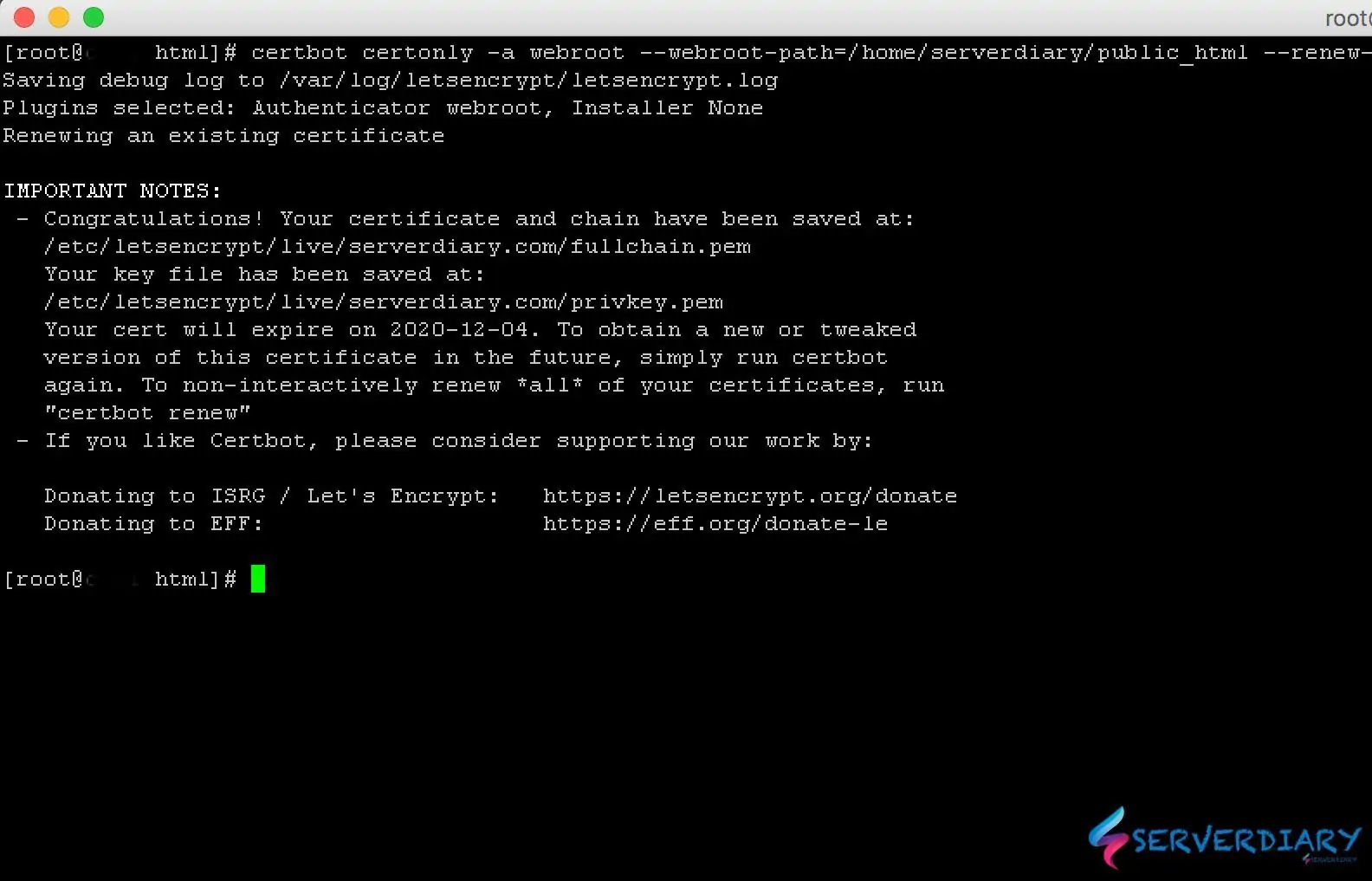
# certbot certonly -a webroot --webroot-path=/home/serverdiary/public_html --renew-by-default --email admin@serverdiary.com --agree-tos -d serverdiary.com -d www.serverdiary.com -d img.serverdiary.comExample output:
# certbot certonly -a webroot --webroot-path=/home/serverdiary/public_html --renew-by-default --email admin@serverdiary.com --agree-tos -d serverdiary.com -d www.serverdiary.com
Saving debug log to /var/log/letsencrypt/letsencrypt.log
Plugins selected: Authenticator webroot, Installer None
........................

IMPORTANT NOTES:
 - Congratulations! Your certificate and chain have been saved at:
   /etc/letsencrypt/live/serverdiary.com/fullchain.pem
   Your key file has been saved at:
   /etc/letsencrypt/live/serverdiary.com/privkey.pem
   Your cert will expire on 2020-12-04. To obtain a new or tweaked
   version of this certificate in the future, simply run certbot
   again. To non-interactively renew *all* of your certificates, run
   "certbot renew"
 - If you like Certbot, please consider supporting our work by:

   Donating to ISRG / Let's Encrypt:   https://letsencrypt.org/donate
   Donating to EFF:                    https://eff.org/donate-le
Now SSL Certificate chain saved on /etc/letsencrypt/live/serverdiary.com/fullchain.pem and key file /etc/letsencrypt/live/serverdiary.com/privkey.pem
Sample Nginx configuration:
server {
	listen       80;
	server_name  serverdiary.com;

	root   /home/serverdiary/public_html;
	index  index.php index.html index.htm;

	location / {
		return 301 https://serverdiary.com$request_uri;
	}
}
server {
	listen       80;
	server_name  www.serverdiary.com;

	root   /home/serverdiary/public_html;
	index  index.php index.html index.htm;

	location / {
		return 301 https://serverdiary.com$request_uri;
	}
}
server {
	listen  213.133.110.88:443 ssl http2;
	server_name www.serverdiary.com;

	root   /home/serverdiary/public_html;
	index  index.php index.html index.htm;

	access_log off;
	ssl_certificate    		/etc/letsencrypt/live/serverdiary.com/fullchain.pem;
	ssl_certificate_key		/etc/letsencrypt/live/serverdiary.com/privkey.pem;

	ssl_session_cache  builtin:1000  shared:SSL:10m;
    #enables all versions of TLS, but not SSLv2 or 3 which are weak and now deprecated.
	ssl_protocols TLSv1 TLSv1.1 TLSv1.2;
    ssl_ciphers HIGH:!aNULL:!eNULL:!EXPORT:!CAMELLIA:!DES:!MD5:!PSK:!RC4;
    ssl_prefer_server_ciphers on;
	ssl_session_timeout 1d;
	ssl_session_cache shared:SSL:10m;
	add_header Strict-Transport-Security max-age=6048000;

	location / {
		return 301 https://serverdiary.com$request_uri;
	}
}

server {
	listen  213.133.110.88:443 ssl http2;
	server_name serverdiary.com;

	root   /home/serverdiary/public_html;
	index  index.php index.html index.htm;

	gzip	on;
	ssl_certificate    		/etc/letsencrypt/live/serverdiary.com/fullchain.pem;
	ssl_certificate_key		/etc/letsencrypt/live/serverdiary.com/privkey.pem;

	#enables all versions of TLS, but not SSLv2 or 3 which are weak and now deprecated.
	ssl_protocols TLSv1 TLSv1.1 TLSv1.2;
    ssl_ciphers HIGH:!aNULL:!eNULL:!EXPORT:!CAMELLIA:!DES:!MD5:!PSK:!RC4;
    ssl_prefer_server_ciphers on;
	ssl_session_timeout 1d;
	ssl_session_cache shared:SSL:10m;
	add_header Strict-Transport-Security max-age=6048000;

	access_log /var/log/nginx/serverdiary.com.ssl.access.log;
	error_log /var/log/nginx/serverdiary.com.ssl.error.log;

	location ~* ^.+\.(jpg|jpeg|gif|png|ico|css|zip|tgz|gz|rar|bz2|pdf|txt|tar|wav|bmp|rtf|js|flv|swf|htm|eot|woff|woff2|ttf|svg|otf)$ {
		add_header Cache-Control "public";
		expires 60d;
		log_not_found off;
		access_log off;
	}
	location ~ /.well-known {
		allow all;
	}

	...........
	...........
}
Also Read:Auto renew Let’s Encrypt SSL Certificate using Systemd and restart Nginx / Apache if success

One thought on “How to obtain Let’s Encrypt SSL Certificate for Apache or Nginx using Certbot”