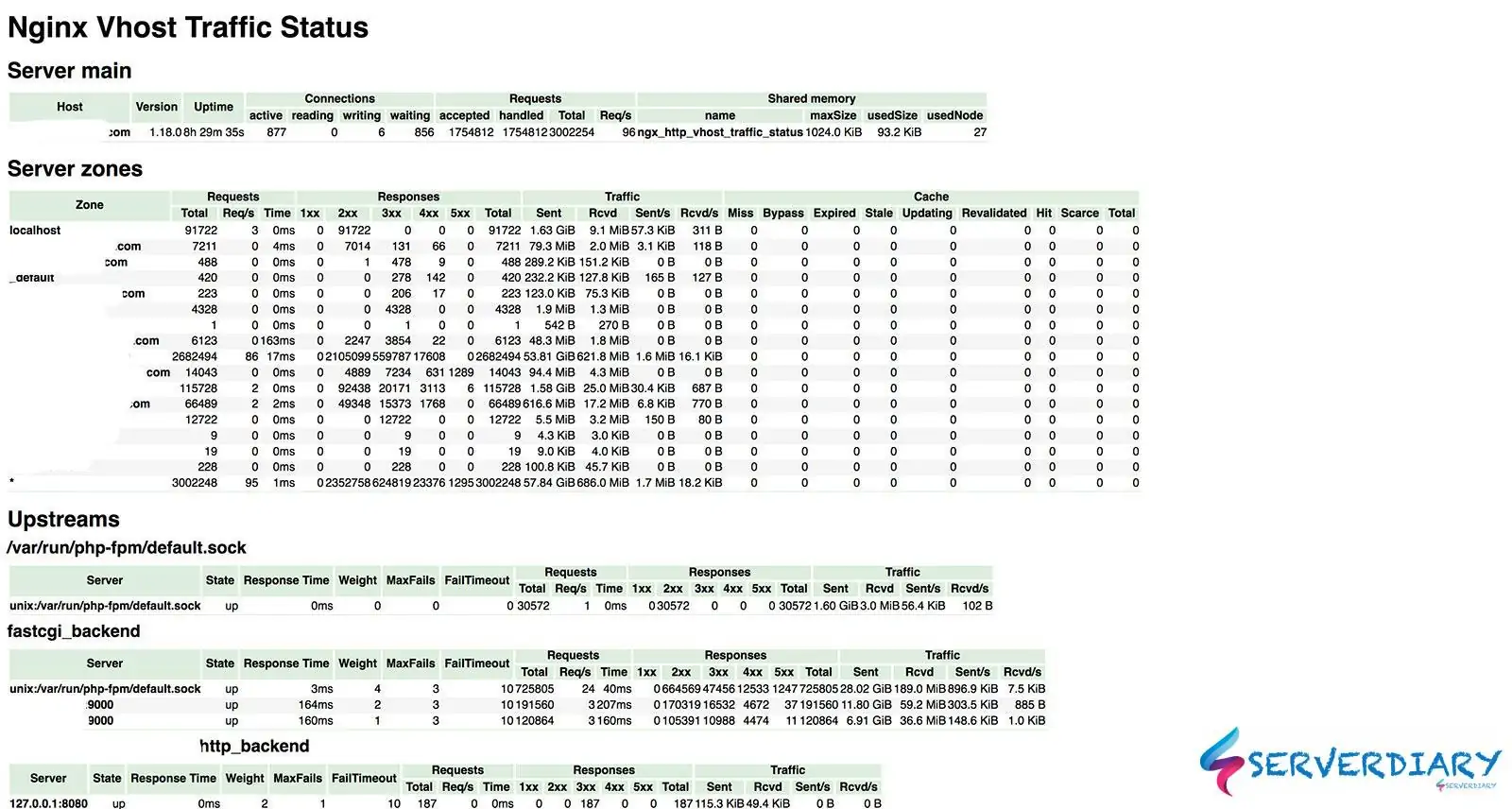
Nginx virtual host traffic status module (Nginx Module VTS) has lot of usefull monitoring for your open source Nginx server.
Nginx Module VTS also can monitoring upstream status and request.
We can monitor traffic by country or city using Max Mind Geo IP database.
This module provides access to virtual host status information.
It contains the current status such as servers, upstreams, caches.
This is similar to the live activity monitoring of nginx plus.
The built-in html is also taken from the demo page of old version.
If we use Nginx as load Balancing, Open Source Nginx does not have upstream monitoring. Only Nginx Plus have a status monitoring.
Also Read: Remove Nginx server header with Nginx Headers More Filter Module
So we can use Nginx virtual host traffic status module to monitor Nginx.
For monitoring result, we can use html format, json or jsonp.
You can read more about all function on Github project page https://github.com/vozlt/nginx-module-vts
How to install and configure Nginx virtual host traffic status module
# yum groupinstall 'Development Tools' -y
# yum install gcc-c++ flex bison yajl yajl-devel curl-devel curl GeoIP-devel doxygen zlib-devel pcre-devel
# yum install lmdb lmdb-devel libxml2 libxml2-devel ssdeep ssdeep-devel lua lua-devel
Clone repository from https://github.com/vozlt/nginx-module-vts
# cd /usr/src
# git clone https://github.com/vozlt/nginx-module-vts.git
In this post, we use lates stable Nginx version 1.18.0. We can check Nginx version with command:
# nginx -V
nginx version: nginx/1.18.0
built by gcc 4.8.5 20150623 (Red Hat 4.8.5-39) (GCC)
built with OpenSSL 1.0.2k-fips  26 Jan 2017
TLS SNI support enabled
configure arguments: --prefix=/etc/nginx --sbin-path=/usr/sbin/nginx --modules-path=/usr/lib64/nginx/modules --conf-path=/etc/nginx/nginx.conf --error-log-path=/var/log/nginx/error.log --http-log-path=/var/log/nginx/access.log --pid-path=/var/run/nginx.pid --lock-path=/var/run/nginx.lock --http-client-body-temp-path=/var/cache/nginx/client_temp --http-proxy-temp-path=/var/cache/nginx/proxy_temp --http-fastcgi-temp-path=/var/cache/nginx/fastcgi_temp --http-uwsgi-temp-path=/var/cache/nginx/uwsgi_temp --http-scgi-temp-path=/var/cache/nginx/scgi_temp --user=nginx --group=nginx --with-compat --with-file-aio --with-threads --with-http_addition_module --with-http_auth_request_module --with-http_dav_module --with-http_flv_module --with-http_gunzip_module --with-http_gzip_static_module --with-http_mp4_module --with-http_random_index_module --with-http_realip_module --with-http_secure_link_module --with-http_slice_module --with-http_ssl_module --with-http_stub_status_module --with-http_sub_module --with-http_v2_module --with-mail --with-mail_ssl_module --with-stream --with-stream_realip_module --with-stream_ssl_module --with-stream_ssl_preread_module --with-cc-opt='-O2 -g -pipe -Wall -Wp,-D_FORTIFY_SOURCE=2 -fexceptions -fstack-protector-strong --param=ssp-buffer-size=4 -grecord-gcc-switches -m64 -mtune=generic -fPIC' --with-ld-opt='-Wl,-z,relro -Wl,-z,now -pie'
Now we need to download Nginx source, depend on our Nginx version.
In this example is Nginx 1.18.0, compile module and compiled Nginx Brotli located in objs.
# cd /usr/src
# wget http://nginx.org/download/nginx-1.18.0.tar.gz
# tar zxvf nginx-1.18.0.tar.gz
# cd nginx-1.18.0
# ./configure --with-compat --add-dynamic-module=/usr/src/nginx-module-vts
# make modules
# cp objs/ngx_http_vhost_traffic_status_module.so /etc/nginx/modules
# chmod 644 /etc/nginx/modules/ngx_http_vhost_traffic_status_module.so
To load Nginx Module VTS, edit /etc/nginx/nginx.conf and add this code in top of configuration.
error_log  /var/log/nginx/error.log warn;
pid        /var/run/nginx.pid;

load_module modules/ngx_http_vhost_traffic_status_module.so;
And on your http block add this code:
http {
	vhost_traffic_status_zone;
	include       /etc/nginx/mime.types;
    	default_type  application/octet-stream;
	.......
	gzip  on;
	.......
	.......
}
By default, shared memory for vhost_traffic_status_zone size is 2Mb. To increase it, add following code:
vhost_traffic_status_zone shared:vhost_traffic_status:32m;We need to protect status page using htpasswd. Create htpasswd file, for example located in /etc/nginx/.htpasswd
# htpasswd -c /etc/nginx/.htpasswd userstatusThen add this code on your server block add this code:
server {
	listen 443 ssl http2;
	servername serverdiary.com;

	.......
	.......

	location /status {
		auth_basic "Restricted";
		auth_basic_user_file /etc/nginx/.htpasswd;

		vhost_traffic_status_display;
		vhost_traffic_status_display_format html;
	}
	.......
	.......
}
Check your Nginx configuration with
# nginx -t
nginx: the configuration file /etc/nginx/nginx.conf syntax is ok
nginx: configuration file /etc/nginx/nginx.conf test is successful
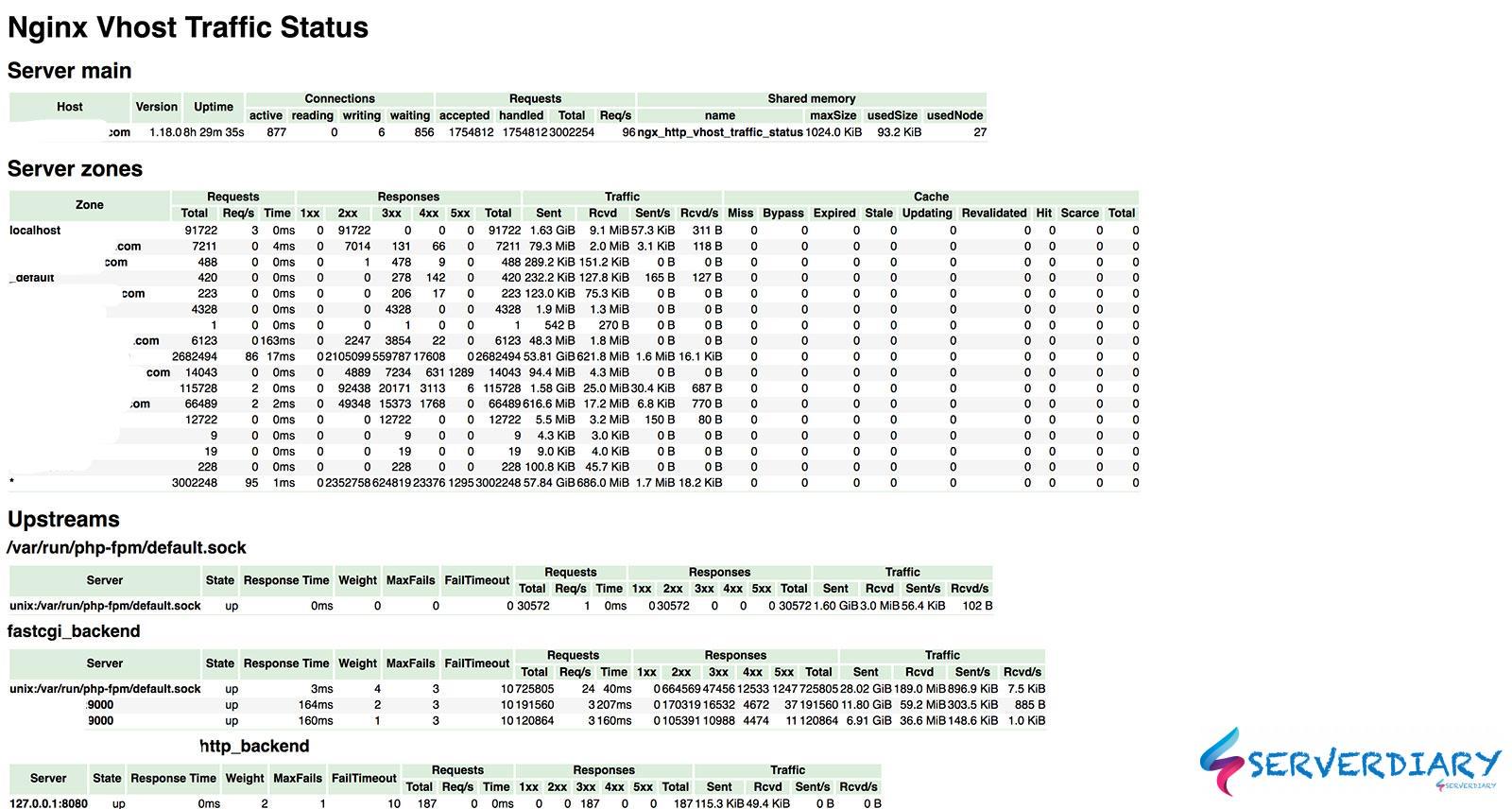
Now, check on https://yourdomain/status
Below is example output:


Good morning. Sorry for these questions, but I would like to know how to customize the Nginx vhost traffic status page and also change the default value of update Time