This post will guide How to install and configure Nginx Headers More Filter Module and completely remove Nginx server header.
For security reason, some times we need to remove all off server header on Nginx.
But default Nginx configuration from Nginx is only remove Nginx version.
server_tokens off;When we user server token off, example header is below:
# curl -s -I -H 'Accept-Encoding: br,gzip,deflate' https://serverdiary.com
HTTP/2 200
server: nginx
date: Sun, 08 Nov 2020 12:51:03 GMT
content-type: text/html; charset=UTF-8
vary: Accept-Encoding
expires: Thu, 19 Nov 1981 08:52:00 GMT
x-content-type-options: nosniff
strict-transport-security: max-age=15768000
content-encoding: br
If we want to completely remove server header, we can use Nginx Headers More Filter Module.
This Nginx module allows you to add, set, or clear any output or input header that you specify.
Also Read: How to install and configure Nginx ModSecurity on Centos 7
This is an enhanced version of the standard headers module because it provides more utilities like resetting or clearing “builtin headers” like Content-Type, Content-Length, and Server.
It also allows you to specify an optional HTTP status code criteria using the -s option and an optional content type criteria using the -t option while modifying the output headers with the more_set_headers and more_clear_headers directives.
Starting from NGINX 1.9.11, we can also compile this module as a dynamic module, by using the --add-dynamic-module=PATH option.
You can read more about this project on https://github.com/openresty/headers-more-nginx-module
How to install Nginx Headers More Filter Module
# yum groupinstall 'Development Tools' -y
# yum install gcc-c++ flex bison yajl yajl-devel curl-devel curl GeoIP-devel doxygen zlib-devel pcre-devel
# yum install lmdb lmdb-devel libxml2 libxml2-devel ssdeep ssdeep-devel lua lua-devel
Clone repository ngx_http_headers_more_filter_module from Github
# cd /usr/src
# git clone https://github.com/openresty/headers-more-nginx-module.git
In this post, we use lates stable Nginx version 1.18.0. We can check Nginx version with command:
# nginx -V
nginx version: nginx/1.18.0
built by gcc 4.8.5 20150623 (Red Hat 4.8.5-39) (GCC)
built with OpenSSL 1.0.2k-fips  26 Jan 2017
TLS SNI support enabled
configure arguments: --prefix=/etc/nginx --sbin-path=/usr/sbin/nginx --modules-path=/usr/lib64/nginx/modules --conf-path=/etc/nginx/nginx.conf --error-log-path=/var/log/nginx/error.log --http-log-path=/var/log/nginx/access.log --pid-path=/var/run/nginx.pid --lock-path=/var/run/nginx.lock --http-client-body-temp-path=/var/cache/nginx/client_temp --http-proxy-temp-path=/var/cache/nginx/proxy_temp --http-fastcgi-temp-path=/var/cache/nginx/fastcgi_temp --http-uwsgi-temp-path=/var/cache/nginx/uwsgi_temp --http-scgi-temp-path=/var/cache/nginx/scgi_temp --user=nginx --group=nginx --with-compat --with-file-aio --with-threads --with-http_addition_module --with-http_auth_request_module --with-http_dav_module --with-http_flv_module --with-http_gunzip_module --with-http_gzip_static_module --with-http_mp4_module --with-http_random_index_module --with-http_realip_module --with-http_secure_link_module --with-http_slice_module --with-http_ssl_module --with-http_stub_status_module --with-http_sub_module --with-http_v2_module --with-mail --with-mail_ssl_module --with-stream --with-stream_realip_module --with-stream_ssl_module --with-stream_ssl_preread_module --with-cc-opt='-O2 -g -pipe -Wall -Wp,-D_FORTIFY_SOURCE=2 -fexceptions -fstack-protector-strong --param=ssp-buffer-size=4 -grecord-gcc-switches -m64 -mtune=generic -fPIC' --with-ld-opt='-Wl,-z,relro -Wl,-z,now -pie'
Now we need to download Nginx source, depend on our Nginx version.
In this example is Nginx 1.16.1, compile module and compiled Nginx Brotli located in objs.
# cd /usr/src
# wget http://nginx.org/download/nginx-1.18.0.tar.gz
# tar zxvf nginx-1.18.0.tar.gz
# cd nginx-1.18.0
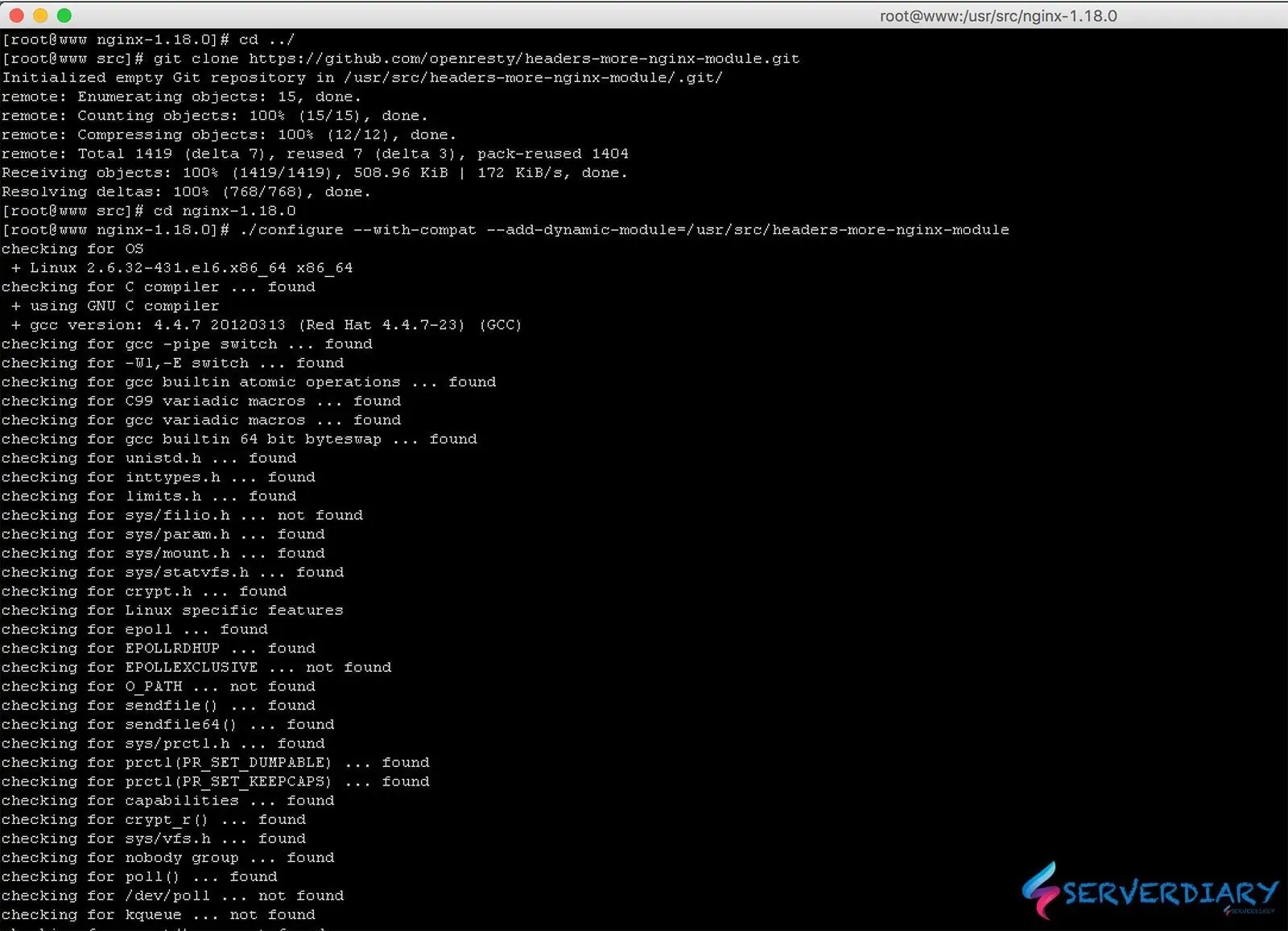
# ./configure --with-compat --add-dynamic-module=/usr/src/headers-more-nginx-module
# make modules
# cp objs/ngx_http_headers_more_filter_module.so /etc/nginx/modules
# chmod 644 /etc/nginx/modules/ngx_http_headers_more_filter_module.so
How To Completely Remove Nginx Server Header
To load Nginx Headers More Filter Module, edit /etc/nginx/nginx.conf and add this code in top of configuration.
error_log  /var/log/nginx/error.log warn;
pid        /var/run/nginx.pid;

load_module modules/ngx_http_headers_more_filter_module.so;
And on your server block add this code:
server {
	.......
	.......

	more_clear_headers  "server";
	more_set_headers "x-frame-options: SAMEORIGIN";
	more_set_headers "x-content-type-options: nosniff";
	more_set_headers "x-xss-protection: 1; mode=block";

	gzip  on;
	.......
	.......
}
Check your Nginx configuration with
# nginx -t
nginx: the configuration file /etc/nginx/nginx.conf syntax is ok
nginx: configuration file /etc/nginx/nginx.conf test is successful
Now start our Nginx and check server header with CURL
# curl -s -I -H 'Accept-Encoding: br,gzip,deflate' https://serverdiary.com
HTTP/2 200
date: Sun, 08 Nov 2020 12:47:20 GMT
content-type: text/html; charset=UTF-8
vary: Accept-Encoding
x-frame-options: SAMEORIGIN
x-content-type-options: nosniff
x-xss-protection: 1; mode=block
content-encoding: br

One thought on “Remove Nginx server header with Nginx Headers More Filter Module”